

Best External Monitors for a College Dorm Desk 2026
None of these five budget monitors offer one-cable USB-C docking, so the real split is panel type, VESA-arm fit, and stand travel. The Dell S2725HS ($159.99) wins on its full height-swivel-pivot stand; the 24-inch KOORUI ($89.99) is the shallow-desk value pick.
This article contains affiliate links. We may earn a commission at no extra cost to you. Learn more
Featured in this Guide

Dell
S2725HS 27" FHD IPS 100Hz Monitor
- •Full height/tilt/swivel/pivot stand, 2x5W speakers, and a 100Hz IPS panel — the buy-it-and-skip-the-arm choice at $159.99, ,
LG
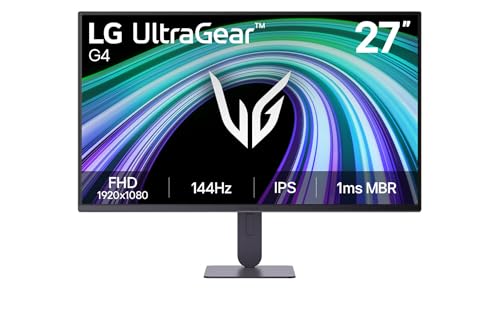
27G414B-B UltraGear 27" FHD IPS 144Hz Monitor
- •144Hz IPS with a height stand and DisplayPort, framed honestly as a gaming-branded panel that doubles for coursework, ,
KOORUI
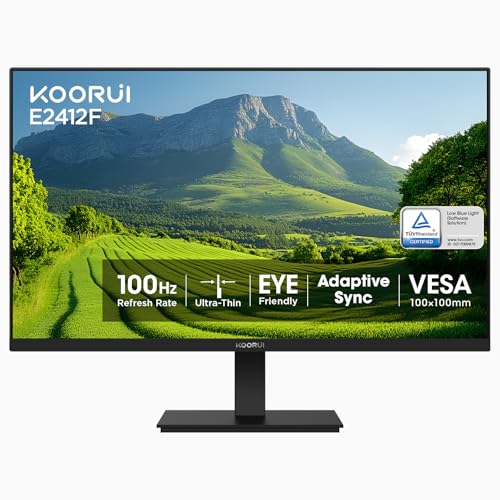
E2412F 24" FHD VA 100Hz Monitor
- •The cheapest pick at $89.99 and the only 24-inch panel, so it fits a shallow desk without crowding your laptop, ,
The Short Answer
For a laptop-plus-one-monitor dorm desk, the Dell S2725HS earns the top score on its fully articulating height/tilt/swivel/pivot stand plus integrated speakers. The 24-inch KOORUI is the best shallow-desk fit at $89.99; the Sceptre concentrates the most inputs. None of the five provides USB-C docking.
You run a laptop as your main machine and want one external screen on a dorm desk that is only about 24 inches deep. Here is the catch that decides everything: none of these five budget monitors carry USB-C, so single-cable docking is off the table for all of them. That step-up starts near $250. So the real split among these picks is panel type, VESA-arm fit, and how far the stand moves, not docking convenience.
The DGH Dorm-Desk Monitor Score ranks them on that reality. It is a weighted composite of panel quality, desk-footprint fit, connectivity, stand and VESA readiness, and value, so a higher number means more usable screen per dollar for a laptop-plus-one-monitor setup. We built it from the manufacturer datasheets we reviewed, not marketing hype.
Head-to-Head: Panel, Ports, and Fit
Tech Charging
Chart
 DormGearHQ.com
ASUS ZenScreen MB16NCG
$266.99Must BuyCheck price
Canon MegaTank G3270 All-in-One Wireless Inkjet Printer, Home Use, Print, Scan and Copy
$159.99Must BuyCheck price
iPad Air 11-inch (M4)
$749.00Must BuyCheck price
Keychron K2 Pro
$119.00Must BuyCheck price
MacBook Air M5 13-inch
$1259.99Must BuyCheck price
Microsoft Surface Pro 11
$1249.99Must BuyCheck price
Best Overall: Dell S2725HS 27" FHD IPS 100Hz Monitor
Dell S2725HS 27" FHD IPS 100Hz Monitor
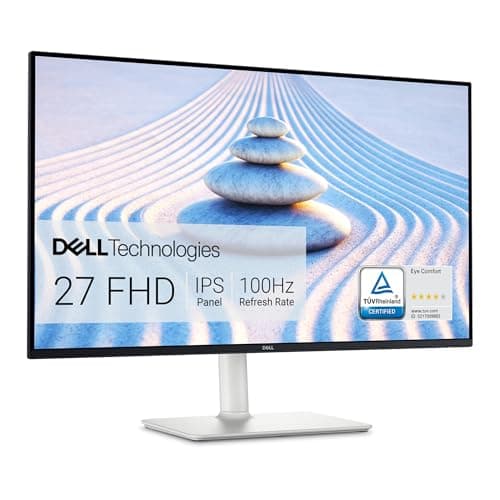
(Current price, subject to change)
- Dell S2725HS 27-inch monitor
- 27-inch 1920x1080 IPS panel, 100Hz
- Two HDMI 1.4 inputs (no DisplayPort, no USB-C)
- Two 5W built-in speakers
- Full height/tilt/swivel/pivot stand, VESA 100x100mm
- Power cable and stand (included)
Dell's datasheet functions as the anchor here, because no major outlet has independently lab-reviewed this exact 2026 SKU. The specification we reviewed documents a 27-inch IPS panel, a 100Hz refresh rate, 1500:1 contrast, and near-reference sRGB color, connected to your laptop through two wired HDMI 1.4 inputs with response times of 8ms, 5ms, and 4ms across its presets. Because there is neither DisplayPort nor USB-C, the laptop charger remains permanently occupied. What notably distinguishes it is the articulating stand: height, tilt, swivel, and pivot, the only full-motion mechanism in the roundup.
That mechanism is precisely why it leads the DGH Dorm-Desk Monitor Score at 7.4. The ergonomics factor rewards a display you can elevate to eye level without purchasing a separate arm, and our formula weights that capability alongside the 2x 5W speakers that reproduce lecture audio. Compared to a conventional 60Hz office panel, the 100Hz refresh delivers appreciably smoother scrolling throughout extended reading sessions. Its honest weakness, evident throughout the spec we reviewed, remains connectivity, where two HDMI ports and nothing further constrain the final score.
What We Love
- The only full height, tilt, swivel, and pivot stand here — you set eye-level height without buying an arm
- Two 5W speakers handle lecture audio and calls, so you skip a separate speaker on a crowded desk
- 27-inch IPS with 1500:1 contrast and near 100% sRGB keeps text and video clean under dorm lighting
- 100Hz refresh scrolls smoother than the 60Hz office panel it replaces
- VESA 100x100mm is confirmed, so a clamp-on arm still bolts on down the road
What Could Be Better
- Two HDMI 1.4 ports only — no DisplayPort and no USB-C, so no single-cable docking
- It costs $159.99, the same as the 144Hz LG, while topping out at 100Hz
- The thinnest video-input count of any pick in the group
The Verdict
If you want one monitor you can set up and forget, the Dell S2725HS 27" FHD IPS 100Hz Monitor fits the brief without compromise. Its 7.4 is the top score here, earned on the only full height, tilt, swivel, and pivot stand plus 2x5W speakers. You give up USB-C and DisplayPort, but no rival stand comes close at $159.99.
Best High-Refresh Dual-Use: LG 27G414B-B UltraGear 27" FHD IPS 144Hz Monitor
LG 27G414B-B UltraGear 27" FHD IPS 144Hz Monitor
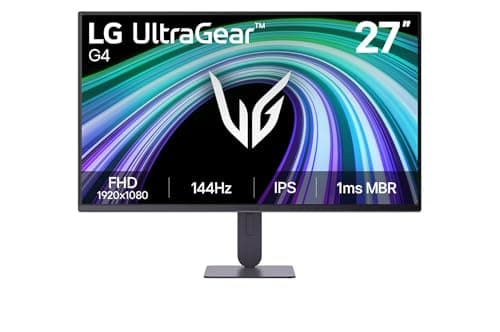
(Current price, subject to change)
- LG 27G414B-B UltraGear 27-inch monitor
- 27-inch 1920x1080 IPS panel, 144Hz
- HDMI and DisplayPort inputs (no USB-C)
- Built-in speaker, HDR10, up to 99% sRGB
- Height and tilt stand (VESA size unconfirmed by LG)
- Power cable and stand (included)
The listing and LG's own page we reviewed agree on the core spec: a 27-inch IPS panel at 144Hz with 1ms MBR motion clarity, HDR10, and up to 99% sRGB color. It connects over wired HDMI and DisplayPort, with no USB-C, so this is not a docking monitor. Frame it honestly: this is a marketed gaming panel, so we treat it as the high-refresh dual-use budget pick rather than a productivity-native screen.
At 144Hz, the panel factor is its principal strength — approximately 1.44x the refresh of the 100Hz picks — which produces noticeably smoother scrolling and cleaner motion. The height-adjustable stand is the secondary advantage, since most budget rivals remain tilt-only. Together those two capabilities anchor its DGH Dorm-Desk Monitor Score at 7.3, placing it immediately behind the Dell. The one caveat that keeps it there is the unpublished VESA pattern, which an arm buyer must have; versus the Dell, you gain refresh but forfeit stand certainty.
What We Love
- 144Hz IPS is the highest native refresh feel here, so scrolling and motion stay smooth for work and after-hours games
- HDR10 and up to 99% sRGB give punchy, accurate color for photos and video
- A height-adjustable stand is rare at this price, so your neck is not stuck at desk level
- DisplayPort plus HDMI covers newer laptops and older docks alike
- The LG Switch app splits the screen into layouts, a real multitasking help for coursework
What Could Be Better
- No USB-C, so the laptop still needs its own charger plus a separate wired video cable
- LG never publishes this model's VESA size — confirm the pattern before you buy an arm
- It is a gaming-branded UltraGear panel, not a productivity-native monitor
The Verdict
If your day is scrolling and coding and your nights drift into games, the LG 27G414B-B UltraGear 27" FHD IPS 144Hz Monitor lines up with what you actually need. The 144Hz IPS and height stand justify the 7.3, just behind the Dell. Confirm the VESA pattern first — LG never published it — before you buy an arm.
Best Value and Small-Desk Fit: KOORUI E2412F 24" FHD VA 100Hz Monitor
KOORUI E2412F 24" FHD VA 100Hz Monitor
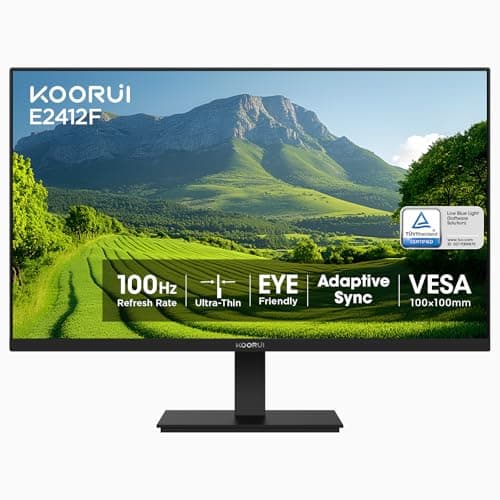
(Current price, subject to change)
- KOORUI E2412F 24-inch monitor
- 24-inch 1920x1080 VA panel, 100Hz
- HDMI and VGA inputs (no DisplayPort, no USB-C)
- 99% sRGB, TUV low-blue-light certified
- Tilt-only stand, VESA 100x100mm
- Power cable and stand (included)
KOORUI's product page we reviewed lists a 24-inch VA panel at 100Hz, 99% sRGB, and a 3000:1 contrast ratio, with HDMI plus VGA and no DisplayPort or USB-C. One honest flag: the Amazon listing states 4000:1, while KOORUI's own page says 3000:1, so we report it as source-dependent and lean on the lower manufacturer figure.
Where it earns its keep is the footprint-fit factor. A 24-inch panel is the one screen here that sits comfortably on a ~24-inch-deep desk without pushing you too close, and the value factor rewards a real second screen at $89.99. The trade is the VA panel: contrast is deep, but viewing angles are narrower and motion smears more than the IPS rivals, even at its rated 1ms MPRT over a wired HDMI connection. Compared to the Samsung, it gives up 27 inches but wins on price, contrast, and desk fit.
What We Love
- The cheapest pick at $89.99 and the best 24-inch fit for a shallow dorm desk, so it never crowds your laptop
- A VA panel enables deep contrast for dark-room movies that the IPS picks cannot match
- 99% sRGB and low-blue-light certification keep color solid for long study sessions
- VESA 100x100mm is confirmed, so a clamp-on arm works if you want height later
- Adaptive-Sync runs the full 100Hz over HDMI for smoother motion
What Could Be Better
- No USB-C and no DisplayPort — HDMI plus VGA only
- A VA panel means narrower viewing angles and more motion smear than the IPS picks
- 24 inches is the smallest canvas in the group
The Verdict
For a shallow desk where a 27-inch panel crowds you, the KOORUI E2412F 24" FHD VA 100Hz Monitor is a sensible pick for that setup. At $89.99 it is the cheapest here, and the 24-inch VA panel fits best and scores 6.7. You trade wide IPS viewing angles for deep contrast, which suits movie nights more than group viewing.
Most Inputs for the Money: Sceptre E275B-FPT165 27" FHD IPS 165Hz Monitor
Sceptre E275B-FPT165 27" FHD IPS 165Hz Monitor
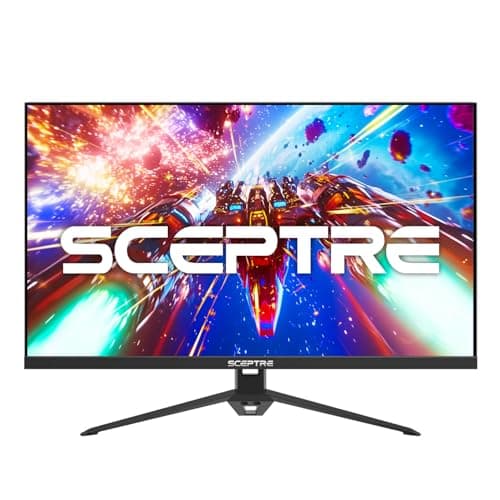
(Current price, subject to change)
- Sceptre E275B-FPT165 27-inch monitor
- 27-inch 1920x1080 IPS panel, up to 165Hz
- Three HDMI plus one DisplayPort (no USB-C)
- Two 2W speakers, 99% sRGB, FreeSync Premium
- Tilt-only stand, VESA 100x100mm
- Power cable and stand (included)
Sceptre's specification page, which we reviewed directly, documents a 27-inch IPS panel operating at up to 165Hz with a 1ms response, 99% sRGB coverage, and AMD FreeSync Premium. Connectivity is precisely where this monitor distinguishes itself: three HDMI inputs plus one wired DisplayPort, more than any competing pick, supplemented by 2x 2W speakers. There remains no USB-C, however, so the docking limitation mirrors the remainder of this group.
Running at up to 165Hz, roughly 1.65x the refresh of the 100Hz panels, it produces the smoothest motion here for scrolling and after-hours gaming alike. The limiting consideration is ergonomics, because the stand adjusts by tilt alone, which means a shallow desk practically demands a 100x100mm VESA arm for height. Versus the LG, it gains inputs and refresh yet forfeits the height-adjustable stand, and that single tradeoff is why it settles a notch lower.
What We Love
- Three HDMI plus one DisplayPort is the most inputs here, so a laptop and a console both stay wired in
- Up to 165Hz IPS is the highest refresh in the roundup for smooth motion
- Two 2W speakers cover basic call and video audio
- 99% sRGB with FreeSync Premium keeps color and motion clean
- The lowest 27-inch price at $107.97
What Could Be Better
- No USB-C, so there is still no single-cable docking despite four video inputs
- Tilt-only stand — budget a VESA arm for height on a shallow desk
- A budget brand with little major-outlet lab testing of this exact SKU
The Verdict
If you plug in a console and a laptop and hate swapping cables, the Sceptre E275B-FPT165 27" FHD IPS 165Hz Monitor checks the boxes that matter for that setup. Four video inputs and up to 165Hz IPS at $107.97 earn a 6.6. It is tilt-only, so budget a VESA arm for height on a cramped desk.
Cheapest 27-Inch IPS: Samsung S30GD 27" FHD IPS 100Hz Monitor
Samsung S30GD 27" FHD IPS 100Hz Monitor
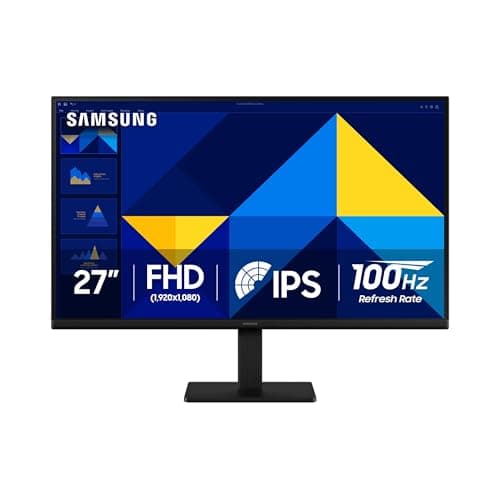
(Current price, subject to change)
- Samsung S30GD 27-inch monitor (LS27D304GANXZA)
- 27-inch 1920x1080 IPS panel, 100Hz
- One HDMI 1.4 plus one VGA (no DisplayPort, no USB-C)
- No built-in speakers, no headphone jack
- Tilt-only stand, VESA 100x100mm
- Power cable and stand (included)
Samsung's official datasheet, which we reviewed, is unusually consequential here, because a widely-circulated blog describes this model incorrectly. That datasheet confirms a 27-inch IPS panel operating at 100Hz with a 5ms GtG response, and it enumerates a single wired HDMI 1.4 input plus one VGA connection only — no DisplayPort, no FreeSync, and no speakers. We deliberately decline to repeat the blog's assertion of DisplayPort and FreeSync, because the manufacturer specification categorically contradicts it.
Within the weighted formula, it finishes last at 5.5. The panel is honest but modest: 250 cd/m2 brightness and 72% NTSC color rank lowest among the IPS picks, and its connectivity is the thinnest, with an aging VGA port substituting for a second modern input. It is admittedly light at 6.4 lb and inexpensive at $139.99, which constitutes essentially its entire argument. Compared to the Dell, you conserve roughly $20 but relinquish the stand, the speakers, and a second usable input.
What We Love
- The cheapest 27-inch IPS in the group at $139.99, so you get a big clean screen for less
- 178-degree IPS viewing angles hold color when a roommate glances over
- A slim, light 2.9 kg / 6.4 lb cabinet is easy to place and move
- VESA 100x100mm is confirmed for a clamp-on arm
- 100Hz refresh scrolls smoother than a 60Hz office panel
What Could Be Better
- No USB-C, no DisplayPort, and no FreeSync — one HDMI 1.4 plus one VGA only
- No built-in speakers and no headphone jack, so plan on separate audio
- The lowest brightness at 250 cd/m2 and color at 72% NTSC of the IPS picks
The Verdict
If your only goal is a big, clean second screen for the least money, the Samsung S30GD 27" FHD IPS 100Hz Monitor is a sensible pick for that narrow setup. Its 5.5 trails the group because it is the most stripped: HDMI plus VGA only, no speakers, tilt-only. You will want an arm and a set of desk speakers.
How We Score: DGH Dorm-Desk Monitor Score
DGH Dorm-Desk Monitor Score
Score Formula
panel_and_image_quality (25%) + dorm_desk_footprint_fit (20%) + connectivity_and_docking (20%) + ergonomics_and_vesa (15%) + value (20%)Score Factors
- Panel and Image Quality (25%)Panel type, contrast, brightness, sRGB coverage, and refresh. IPS earns wide 178-degree angles and accurate color for shared viewing; VA earns deep 3000:1 contrast but narrower angles. The heaviest factor, because the panel is what you stare at across a 4-year dorm run.
- Dorm-Desk Footprint Fit (20%)How the panel sits on a built-in desk about 24 inches deep. A 24-inch monitor sits beside a laptop comfortably; a 27-inch on its stock stand crowds a shallow desk and pushes you too close, which is why an arm helps.
- Connectivity and Docking (20%)Video inputs and audio out. None of the five carry USB-C, so single-cable docking is off the table across the board; this factor instead rewards DisplayPort, extra HDMI, and built-in speakers, and penalizes VGA-only, speaker-less designs.
- Ergonomics and VESA (15%)Stand travel plus VESA readiness. A full height/tilt/swivel/pivot stand scores highest; tilt-only stands score lowest and lean on a 100x100mm VESA arm for height. An unpublished VESA pattern is a scored risk for arm buyers.
- Value (20%)Features and panel measured against the live price. A $89.99 24-inch VA panel and a $107.97 165Hz IPS panel change the per-dollar math against pricier picks, so value credits spec-per-dollar, not the lowest sticker alone.
DGH Dorm-Desk Monitor Score — Ranked
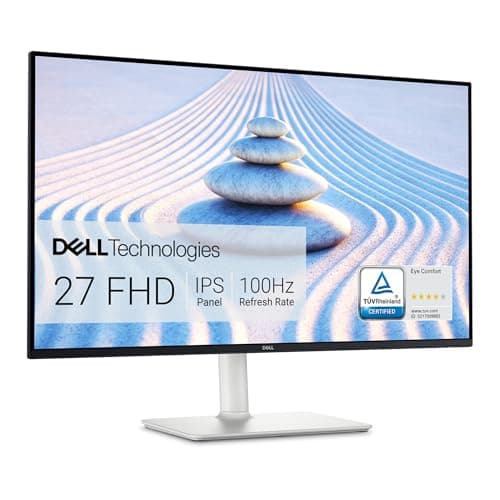
Dell S2725HS 27" FHD IPS 100Hz Monitor
7.4/10The only full-motion stand plus 2x5W speakers carries a 100Hz IPS panel past the field, despite two-HDMI-only connectivity
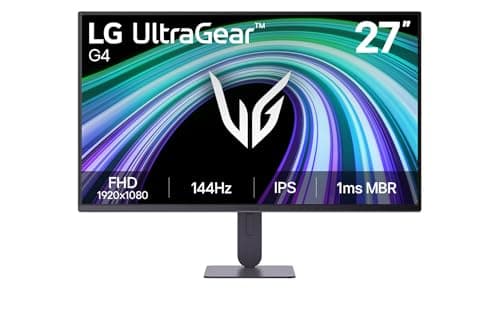
LG 27G414B-B UltraGear 27" FHD IPS 144Hz Monitor
7.3/10144Hz IPS, HDR10, and a height stand nearly tie the Dell; the unconfirmed VESA pattern is the only real drag
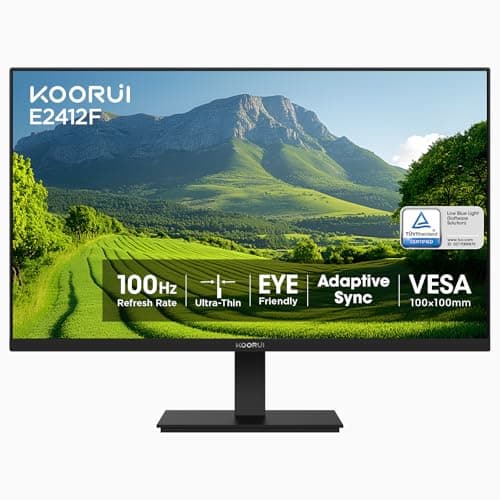
KOORUI E2412F 24" FHD VA 100Hz Monitor
6.7/10A 24-inch VA panel at $89.99 wins fit and value, offset by narrower angles and HDMI-plus-VGA connectivity
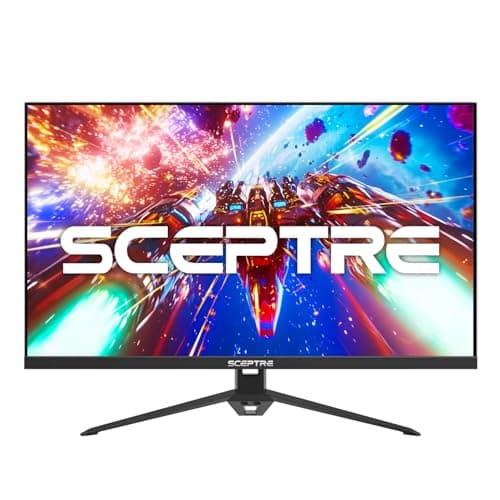
Sceptre E275B-FPT165 27" FHD IPS 165Hz Monitor
6.6/10Four inputs and up to 165Hz IPS at $107.97, held back only by a tilt-only stand on a shallow desk
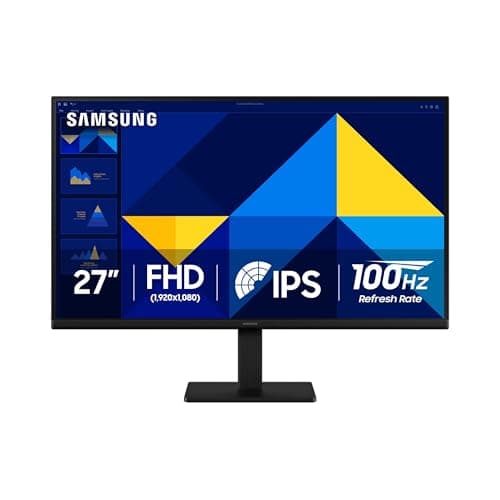
Samsung S30GD 27" FHD IPS 100Hz Monitor
5.5/10The cheapest 27-inch IPS, but the most stripped: HDMI plus VGA, no speakers, and the dimmest, least-colorful panel
Fit, Arms, and No-Fuss Setup
Most built-in dorm desks measure roughly 24 inches in depth, and once a 14-inch laptop footprint is subtracted, approximately 10 inches of usable depth remains. That constrained geometry explains why the 24-inch KOORUI E2412F 24" FHD VA 100Hz Monitor is the most accommodating fit, and why a 27-inch panel benefits substantially from a clamp-on arm that reclaims the stand's depth. The recommended 1080p viewing distance spans roughly 2.5 ft to 3 ft, so a 27-inch screen pushed against the desk edge can position you uncomfortably close.
Four of the five monitors confirm a 100x100mm VESA pattern, so a conventional arm attaches without difficulty. The Dell S2725HS 27" FHD IPS 100Hz Monitor is the pick that least requires an arm, owing to its full-motion stand, whereas the tilt-only Sceptre E275B-FPT165 27" FHD IPS 165Hz Monitor and Samsung S30GD 27" FHD IPS 100Hz Monitor benefit most from one. The LG's VESA pattern remains unpublished, so verify it before committing to an arm. Every monitor connects through a straightforward wired HDMI cable, and the datasheets we reviewed confirm that across a 4-year dorm run, a second screen repeatedly justifies its cost. If refresh rate and response time matter more to you than desk-fit and docking, our Best Gaming Monitors for a Dorm Desk 2026 roundup scores the same LG UltraGear panel on a gaming-first lens instead.
| Product | Fits a shallow 24-inch-deep desk on the stock stand | Height-adjustable stand (no arm needed) | Confirmed 100x100mm VESA for an arm |
|---|---|---|---|
| dell-s2725hs | – | ✓ | ✓ |
| lg-27g414b-ultragear | – | ✓ | – |
| koorui-e2412f-24 | ✓ | – | ✓ |
| sceptre-e275b-27 | – | – | ✓ |
| samsung-s30gd-27 | – | – | ✓ |
The Complete Workstation Bundle: Monitor, Arm, and Dock
Every figure in this bundle was independently re-verified against the Amazon Creators API on 2026-07-27, the same afternoon this module was written. The cart pairs the Dell 27 Plus 4K USB-C Monitor (S2725QC) at $299.99 with the NB North Bayou Full-Motion Single Monitor Arm (G70-W, Gas Spring) at $29.90 to reclaim the desk depth a 27-inch panel demands on its stock stand, plus a UGREEN Revodok Pro 106 USB-C Hub (6-in-1) at $15.99 for the specific laptop that cannot drive this monitor over a single cable — bringing the complete workstation to $345.88. One transparency note on the arm: its verified Buy Box is a third-party Amazon marketplace seller rather than shipped-and-sold-by Amazon — the listing checked New and in stock on our verification date, but buy it knowingly. That third line item needs an honest explanation rather than a reflexive add, because the S2725QC's own USB-C port already carries 65W of power delivery plus DisplayPort Alt Mode video and data together, which genuinely eliminates the hub for any laptop whose USB-C output supports DisplayPort Alt Mode, the same one-cable win our Best Laptops for College Students 2026 and Best MacBooks for College 2026 desk-bundle math prices for the budget 1080p tier. The hub earns its spot only for the older or budget Windows laptop whose USB-C port charges and moves data but never carries a video signal — in that specific case the monitor's HDMI 2.1 input takes over the picture, and the hub's own USB-A and SD ports pick up the peripheral slack the monitor's rear ports do not cover.
Skip the hub entirely and the same cart drops to $329.89, and most MacBook and recent Windows-ultrabook owners should do exactly that, since their laptops already speak DisplayPort over USB-C and would just be paying for a redundant cable path. Confirm your specific laptop supports DisplayPort Alt Mode over USB-C — not every USB-C port does, and a port that only charges will silently show no picture — before committing to the single-cable version of this cart.
Worth the Upgrade: When a Genuine 4K USB-C Panel Actually Justifies the Considerable Extra Expenditure
Every pick in the original roundup above tops out at 1080p and none of the five carries USB-C, and that is a deliberate budget-tier boundary rather than an oversight — but it leaves the real step-up question unanswered for the reader who has outgrown it. The Dell 27 Plus 4K USB-C Monitor (S2725QC) is that answer: a 27-inch 4K IPS panel at 3840x2160 and 120Hz, which Dell's own spec page and an independent pcmonitors.info review both confirm, with a USB-C port that carries 65W of power delivery, DisplayPort Alt Mode video, and upstream data over one cable — the single-cable docking this guide's FAQ already told readers to expect near $250, now priced out as a specific, live-verified product at $299.99 rather than left as a placeholder figure.
The trade is real and worth stating plainly: at $299.99 this panel costs roughly double the guide's original 1080p roster, and its 65W of upstream power delivery covers any MacBook Air or mainstream Windows ultrabook but falls short of a 16-inch MacBook Pro running full tilt. What the extra spend buys is the actual convenience this guide's FAQ names as the reason to pay near $250 for a step-up — one cable for power, video, and data — plus 4K resolution and double the refresh rate of Dell's own prior-generation S2721QS. Pair it with the NB North Bayou Full-Motion Single Monitor Arm (G70-W, Gas Spring) below for the desk-clearing lift the Dell S2725HS 27" FHD IPS 100Hz Monitor already gets from its built-in full-motion stand, and the step-up tier matches that convenience at 4K instead of 1080p.
Who Should Buy What
Who Should Buy What
| If you are… | Recommended pick |
|---|---|
Set-it-and-forget-it student You want the most adjustable stand and built-in speakers without buying a monitor arm | Dell S2725HS 27" FHD IPS 100Hz Monitor |
Work-by-day, game-by-night You want smooth 144Hz motion and a height stand and will double the screen for gaming | LG 27G414B-B UltraGear 27" FHD IPS 144Hz Monitor |
Shallow-desk minimalist Your desk is cramped and your budget is tight, and a 24-inch VA panel with deep contrast fits your movie nights | KOORUI E2412F 24" FHD VA 100Hz Monitor |
Console-plus-laptop juggler You need the most video inputs and the highest refresh, and you will add a VESA arm for height | Sceptre E275B-FPT165 27" FHD IPS 165Hz Monitor |
Bare-minimum second screen You just need a big 27-inch IPS panel for the least money and will supply your own speakers and arm | Samsung S30GD 27" FHD IPS 100Hz Monitor |
Frequently Asked Questions
Is 24 or 27 inches better for a dorm desk?
On a typical 24-inch-deep dorm desk, a 24-inch panel like the KOORUI fits most comfortably and stays a sharp 1080p at about 92 ppi. A 27-inch gives more room for side-by-side windows but softens to about 82 ppi at 1080p and can crowd a shallow desk. The move most guides skip: pair a 27-inch with a clamp-on VESA arm to reclaim the stand's depth and set a comfortable 2.5 ft to 3 ft distance.
Do I need USB-C to connect my laptop?
It is convenient, not required. USB-C can run video, data, and laptop charging over one wired cable, which PCWorld calls consolidating to a single cable. But none of these five have USB-C, so you connect over a wired HDMI or DisplayPort cable and keep your laptop charger. Across the listings we reviewed, that pattern held for every pick. If one-cable docking is a must-have, expect to spend near $250 for a USB-C monitor with power delivery.
IPS or VA for a dorm room?
IPS, on four of these picks, gives wide 178-degree angles and accurate color, which helps when a roommate glances over or you sit off to the side. VA, on the KOORUI, gives deeper 3000:1 contrast for movies in a dark room but narrower angles and more motion smear. Across the panels we reviewed, that tradeoff held consistently. For mixed coursework plus shared viewing, IPS is the safer dorm default.
Will these work with a monitor arm?
Four of five confirm a 100x100mm VESA mount — the Dell, Samsung, KOORUI, and Sceptre — so a standard clamp-on arm works, which especially helps the tilt-only picks. The catch the spec tables we reviewed surface, much as RTINGS flags for USB-C monitors: the LG 27G414B-B's VESA size is not published on LG's page, so confirm the pattern before buying an arm for it.
Is 1080p enough for college?
For most coursework — writing, browsing, video calls, and lecture streams — yes, especially at 24 inches. At 27 inches, 1080p text softens up close, so heavy coders and readers may prefer a 1440p 27-inch as a step-up. All five picks we reviewed here are 1080p to hold the roughly $90 to $160 budget, which is enough at a normal desk distance.
Bottom Line
Get the Dell S2725HS 27" FHD IPS 100Hz Monitor if you want the most adjustable stand and built-in speakers without adding a monitor arm.
Get the KOORUI E2412F 24" FHD VA 100Hz Monitor if you want the cheapest pick and the easiest 24-inch fit on a shallow dorm desk.
Get the Sceptre E275B-FPT165 27" FHD IPS 165Hz Monitor if you want the most video inputs and the highest refresh at the lowest 27-inch price.
For most dorm buyers the right call is the Dell S2725HS 27" FHD IPS 100Hz Monitor at $159.99 — the top DGH Dorm-Desk Monitor Score at 7.4, earned on the only full-motion stand plus speakers, since our weighted composite rewards a screen you can place right without an arm. On a shallow desk or a tight budget, the KOORUI E2412F 24" FHD VA 100Hz Monitor fits best at $89.99. Remember the shared limit across a 4-year run, which the listings we reviewed confirm: none of these five offer USB-C docking, so if that is a must-have, budget near $250 for a step-up.
Sources & Methodology
Methodology: DGH Dorm-Desk Monitor Score — Formula: panel_and_image_quality (25%) + dorm_desk_footprint_fit (20%) + connectivity_and_docking (20%) + ergonomics_and_vesa (15%) + value (20%). Factors: Panel and Image Quality (25%) · Dorm-Desk Footprint Fit (20%) · Connectivity and Docking (20%) · Ergonomics and VESA (15%) · Value (20%). Full factor definitions appear in the How We Score section above.
Expert review sources used in this analysis:
- DormGearHQ aggregates manufacturer specifications and customer-rating sentiment to produce consensus-based guidance; we do not perform first-party testing
- For this roundup, no major outlet has lab-reviewed these exact budget SKUs, so we leaned on the manufacturer datasheets we reviewed — Dell, LG, Samsung, KOORUI, and Sceptre — plus the live Amazon listings we reviewed and verified as of July 2026
- Two review blogs that rank for these models contain factual errors: one claims the Samsung S30GD has DisplayPort, FreeSync, and 4ms response, which Samsung's own datasheet contradicts (HDMI plus VGA only, 5ms GtG), and another misattributes the Dell to a different brand
- We cite neither
- The single-cable USB-C benefit and the roughly $250 floor for a genuine USB-C monitor come from PCWorld, and RTINGS is the standing authority on the USB-C monitor category we referenced for context
- The DGH Dorm-Desk Monitor Score is a weighted composite: our formula weights panel and image quality at 25%, dorm-desk footprint fit at 20%, connectivity at 20%, ergonomics and VESA at 15%, and value at 20%, with each factor normalized to a 0-10 scale from the verified specs
- That calculation yields one number per monitor, and it ranks the Dell first because its full-motion stand and speakers clear the field
- Prices and availability for the original five picks were verified 2026-07-12; confirm live pricing and stock before buying
- The worth-the-upgrade tier and workstation bundle added 2026-07-27 price the [[product:dell-s2725qc-4k-usbc]] against Dell's own product page and an independent pcmonitors.info spec review, alongside the Amazon Creators API; that same 2026-07-27 check also re-verified the [[product:north-bayou-monitor-arm]] at $29.90 and the [[product:ugreen-revodok-pro-106-hub]] at $15.99, both New and in stock.
Nicholas Miles is the founder of DormGearHQ and a longtime smart home enthusiast focused on helping everyday homeowners make better technology decisions. He researches, compares, and writes about products across security, climate, lighting, leak prevention, sensors, home energy, and automation, with an emphasis on real-world usefulness, ecosystem compatibility, reliability, privacy, and long-term value.
Affiliate disclosure: DormGearHQ earns affiliate commissions on qualifying Amazon purchases. Our scoring methodology is independent of affiliate relationships.
More Guides
tech-charging
The Premium Dorm Tech Stack: Allocating $1500 Before Move-In

tech-charging
Best Mac Mini & Compact Desktops for Dorm Battlestations 2026
tech-charging
Best Gaming Monitors for a Dorm Desk 2026
tech-charging
Best Portable Monitors for Dorm 2026
desk-study